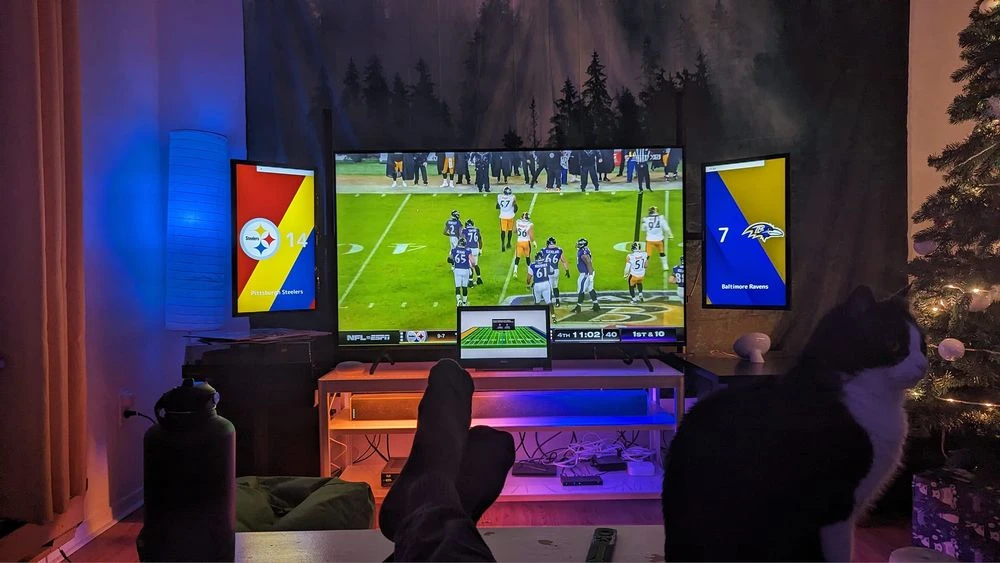
Wie man Anzeigetafeln mit ConnectedRoom erstellt

Scoreboards sind eine schöne Möglichkeit, Ihr Sporterlebnis zu Hause zu verbessern. Sie bieten ergänzende Daten zum Spiel und können die Atmosphäre leicht verbessern. Wenn Sie einen Sportraum oder eine Männerhöhle bauen oder einfach nur das Sport schauen zu Hause verbessern möchten, bietet Ihnen ConnectedRoom die Werkzeuge zum Erfolg.
In diesem Leitfaden erfahren Sie, wie Sie Scoreboards für die NHL, NFL oder andere unterstützte Ligen auf jedem Gerät anzeigen können, das einen Browser hat.
Sie benötigen mindestens einen zusätzlichen Bildschirm, um eine oder mehrere Anzeigetafeln anzuzeigen.
A device with a Web browser that has enough gpu and cpu power to run scoreboards smoothly.
Choosing a device can be hard when you don't know what is needed. All that is required is a browser support. Although that is really it, I would recommend a device with enough gpu power and a good cpu. Scoreboards are meant to be displaying animations and they need to be able to make up for a smooth experience.
Here is a list of devices that have been tested and that gives a good experience:
| Device | Reasons why |
|---|---|
| Fire Stick | Most people use Fire Sticks or Fire TV to host their scoreboads. You can buy one here. If you are in Canada, they are also available on Amazon Canada. |
| Ipad | An old Ipad you do not use can still be able to display scoreboards. Ipad can also be put in Kiosk Mode which makes them easy to setup for always up device. Be advised that older versions of Ipad won't work due to modern browser technology required by scoreboards. |
| Intel Compute Stick | Any mini-pc with an Intel CPU that is recent enough will be powerful enough to display scoreboards. We also have ISOs available for more advanced users. Message me for links. |
| Old laptop | As long as the gpu can handle the animations, there is no reason not to try. |
| Old PC | As long as the gpu can handle the animations, there is no reason not to try. |
Jetzt, da Sie alles haben, was Sie benötigen, um eine ConnectedRoom Anzeigetafel zu erstellen, können Sie die nächsten Schritte befolgen, um Ihre erste Anzeigetafel zu erstellen.
Öffnen Sie auf Ihrem Gerät devices.connectedroom.io in einem Webbrowser.
Ein Gerätecode wird Ihnen gegeben
Befolgen Sie die Anweisungen auf dem Bildschirm, um die Anzeigetafel mit Ihrem Konto zu verknüpfen.
Konfigurieren Sie Ihre Anzeigetafel so, wie Sie möchten
Voila! Sie haben Ihre erste Anzeigetafel erstellt.